Southcot Services Ltd

46 Tuffley Crescent
Gloucester GL1 5NE UK

+44 1452 423671
+44 7768 856937

Accessing mail using a Browser

You can access your standard and advanced e-mail accounts using a browser by going to the URL:-

http://webmail.yourdomain

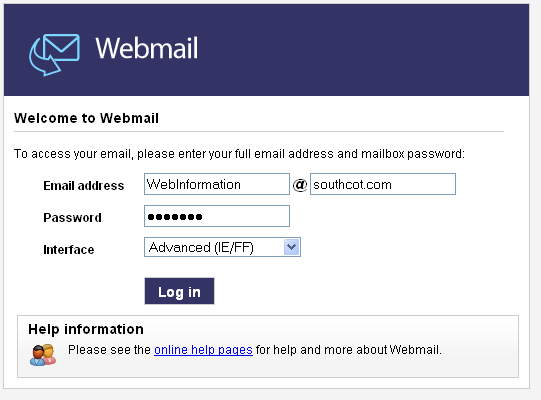
At that page, you will be presented with three edit boxes as shown below. In the first box enter your mailbox name, eg "WebInformation". IN the second box type your domain eg "southcot.com". enter the password and click "Log In". Normally you should leave "Interface" as it is.
If you want to go there now enter you domain here then click "Go".


(Don't use http or www with the domain (http://southcot.com and www.southcot.com are wrong you should type southcot.com)

The Webmail Interface


Visit us on Google Plus
  

Dynamsoft SCM Anywhere
Secunia Software Inspector
Security check this page


Valid XHTML 1.0 Strict Valid CSS!

Print Friendly and PDF
